Nearby Signal
See the Bluetooth activity already around you.
A native macOS view of nearby Bluetooth Low Energy broadcasts, their relative signal strength, and packet cadence.
brew tap scotthaleen/nearby-signal https://github.com/scotthaleen/nearby-signalbrew install --cask scotthaleen/nearby-signal/nearby-signal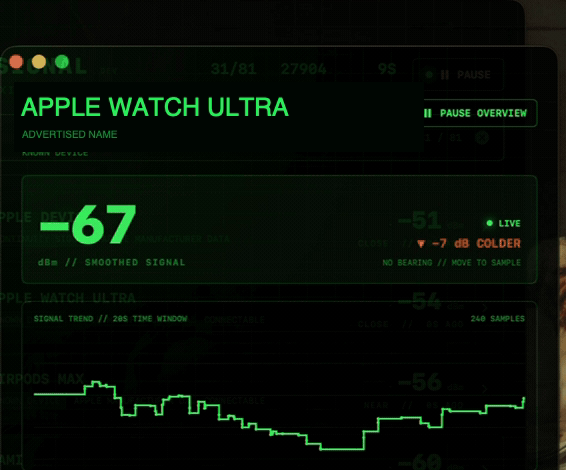
Nearby Signal turns the Bluetooth Low Energy advertisements that macOS can already hear into a live, readable signal view. The overview is for surveying a room and narrowing a crowded scan, while a separate inspector follows one advertiser’s signal and packet behavior over time.
The app stays within the limits of the radio data it receives. Signal strength can show whether a broadcast is getting stronger or weaker, but walls, people, interference, transmit power, and device orientation prevent it from acting as a distance meter or directional finder.
Nearby Signal is available for macOS 13 or later as a Homebrew cask. Version 0.1.0 installs both the application and a nearby-signal terminal launcher; the app asks for Bluetooth permission on first launch.
The current release is ad-hoc signed rather than Developer ID signed and notarized. macOS may require approval in System Settings > Privacy & Security before the first launch.
What the interface makes visible.
Live signal overview
Rank active BLE advertisers by smoothed received signal strength, with packet count, sample age, and periodic resorting visible.
Names without guesswork
Use advertised names when devices publish them and label unidentified broadcasts as unnamed instead of inferring an identity.
Focused inspection
Open one signal to compare raw and smoothed RSSI, packet timing, observed receive rate, services, and advertisement metadata.
Honest quiet periods
Plot samples on a real time axis, hold the last measurement during radio silence, and show when the display is receiving or waiting.
Local by design
Listen passively through CoreBluetooth without connecting to devices, uploading observations, or saving scan history.
Explicit limits
Present RSSI as a relative trend, not exact distance, direction, ownership, or a public Bluetooth hardware address.
Move from the broad view to the useful detail.
- 01
Install
Use the Homebrew cask to install the macOS app and its nearby-signal terminal launcher.
- 02
Survey
Open the app and let the overview collect a room-level signal snapshot.
- 03
Narrow
Filter by advertised name, classification, source, or service identifier.
- 04
Inspect
Select one card to watch its signal trend, cadence, and current advertisement details.